October was our busiest month so far, with more than thirty updates to the app. Many of them were worked out with a livery yard in Finland, around its feeding rounds, its vet days and its medicine cabinet.
This post goes through the ones that change your day. The full list, small fixes included, is in the app under What's new in the menu.
01 In Europe
Scan the paperwork instead of typing it
A vet day leaves a pile of paper behind: an invoice, a report for each horse, labels from the pharmacy. Typing it all in is the job that waits until tomorrow. Now you can photograph it.
Scan the vet's papers
Photograph the papers, or choose photos and PDFs. The app reads them and proposes each horse's medicines, vaccinations and withdrawal periods for its records. Nothing is saved until you have checked it. You'll find it on the Health page and on each horse's profile.
Scanned papersVet day 14/10/2026
5 pagesKavio Equine Clinic · 5 pages
Reading the pages
You can leave this page. We’ll let you know when it’s ready to check.
Each horse’s medicines come from its own report.
Horses on the papers
- Koivulan AapeliAapoby microchip
- ViljaVilja
- NellaNella
Koivulan Aapeli → Aapo
food-producing on the papers · report on page 3
Tick each flagged entry as checked, or edit it, to save.
Medication log
-
Lidor 20 mg/ml
Quantity: 5 mlMeat: blankCompetition: 14 days
Reason: Nerve block: lameness exam
Printed: 4 d skin, 14 d joint
- The meat withdrawal is blank on the papers: ask the vet. It is never taken as 0.
- The competition withdrawal depends on how it was given: the longest was taken.
Checked Edit Page 3 -
Equisedan 10 mg/ml
Quantity: 0.5 mlMeat: 0 daysCompetition: 4 days
Reason: Sedation: X-rays
EditPage 3
Not logged (supplies and work): X-ray supplies
Vilja
food-producing on the papers · report on page 4
Medication log
-
Equisedan 10 mg/ml
Quantity: 0.5 mlMeat: 0 daysCompetition: 4 days
Reason: Sedation: rasping
EditPage 4
Vaccinations
-
Equilis Prequenza Te
Influenza (Flu) · next due 14/04/2027
Tetanus · next due 14/10/2027
Withdrawal periods on the vet’s papers: meat 0 days, competition 5 days.
EditPage 4
Follow-ups
Tick one to get a reminder for this horse.
- Dental check every 6 months Reminder date14/04/2027
Nella
report on page 5
No medicines for this horse on the papers.
Vaccinations
-
Equip F
Influenza (Flu) · next due 14/04/2027
Withdrawal periods on the vet’s papers: meat 0 days, competition 5 days.
EditPage 5
The medication log is the yard’s own statement: what you save is yours.
Farrier bills, dewormer receipts and rechecks
A farrier's bill becomes a visit for each horse, with its share of the cost and a reminder when the bill names the next visit. A dewormer bought from a pharmacy or a web shop becomes a deworming for the horses you choose.
In the farrier form, Fill from a bill fills in the date, the cost and the next visit while you carry on. Under an injury, Add from a paper turns the vet's recheck report into a follow-up. How it's going is always yours to say.
Horses from their passports
Photograph a horse's passport or registration papers, or a whole stack at once. The name, birth date, microchip, UELN and pedigree are filled in for you to check before the horses are added. Reading horse papers is free, and only the details you add are kept, not the pages.
Feed deliveries, Word files and shared statements
A feed receipt, delivery note or order confirmation becomes deliveries in the Feed Log, matched to your feeds. A vet's report sent as a Word file scans like a PDF, and a medication statement that lists several horses is split so each horse gets only its own medicines.
This is the first version of scanning, and real papers teach it fastest. If it reads something wrong, tell us at support@horsies.io. The home page shows a scan from start to finish.
02
Medicines, from the vet visit to the last dose
At a yard, one course of medicine passes through many hands. October's changes follow it from start to finish.
The medication board
Feeding & meds now has a Medications tab: every dose of yesterday and today on your horses, in the order of their places, with each horse's allergies beside it. Tap Given when you give one, or Record several for a group.
Whoever is on duty sees who gave what and when, and the dashboard says how many doses are waiting. Print list puts the day's doses on paper for the medicine cabinet.
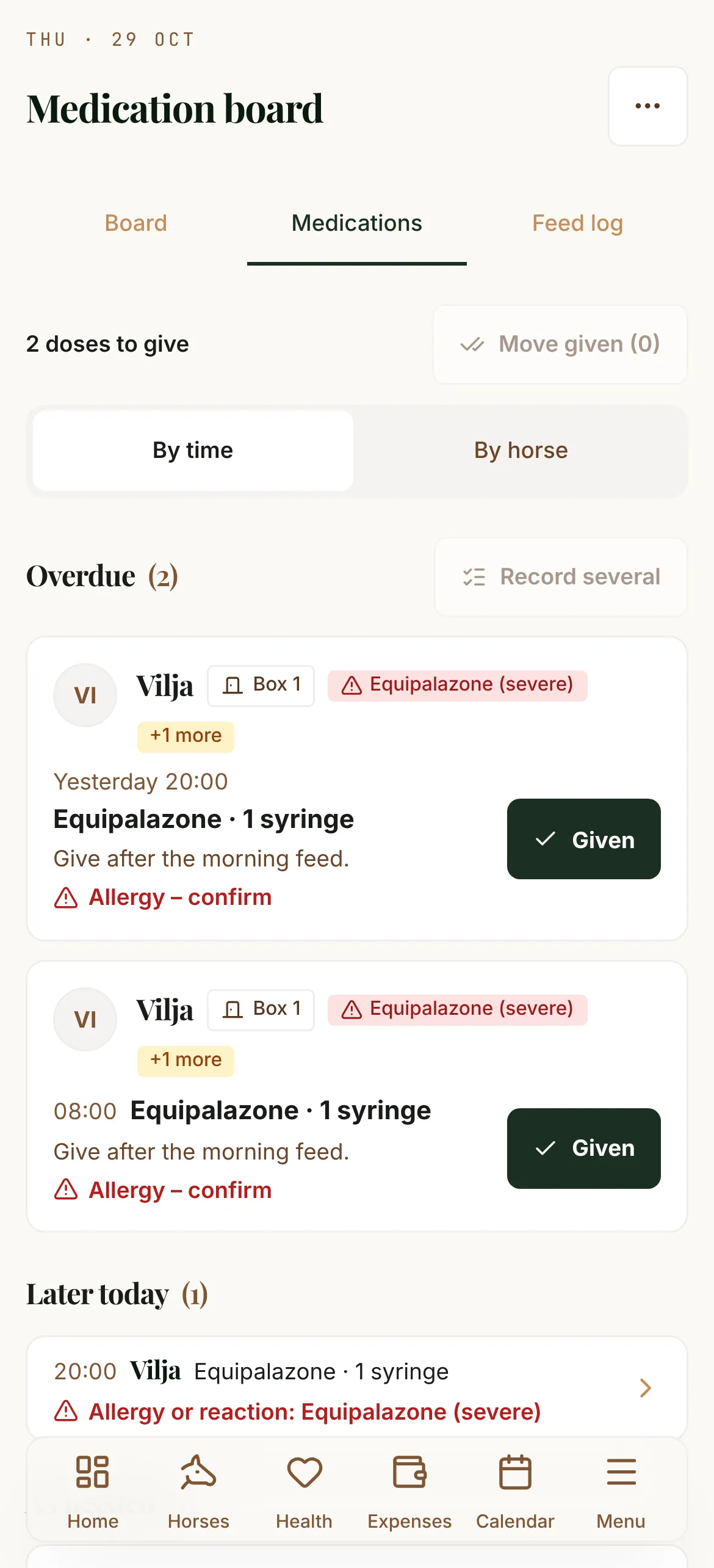
Record each dose, or given as prescribed
Each course keeps its last 30 days of doses: given, skipped or missed, by whom and when. When you add a course, you choose how its doses are recorded.
Record each dose keeps them on the board until someone marks them given. Given as prescribed shows them as reminders nobody has to tick, and you record only a dose that was skipped, missed or given differently.
One vet visit, all its medicines
Record a vet visit or a dental day together with the medicines given at it, for one horse or several. Each medicine goes into the medication log, linked to the visit.
Choose Several horses in the medication form to log one medicine for the whole yard. Each horse still gets its own entry, its own dose if it differs, and its own expense.
Allergies the whole team sees
Record a horse's allergies and reactions once. They show on every tab of its profile, on the feeding board and the door cards, and in the vet report. The medicine and vaccine forms warn you, and ask you to confirm, before you save something the horse has reacted to.
A complete medication log In Europe
The medication form says what the medication log still lacks, in the Stable Folder's own words: the reason, who started the treatment, the withdrawal period, the supplier and proof of acquisition. A slaughter prohibition is copied from the passport onto the horse's profile.
The medicine search now includes FEI's detection times. A detection time is not a withdrawal time: your vet sets the withdrawal from it. More on that in our guide to withdrawal times.
03
The feed room
Feed was October's other big theme: who gets what, which lot it came from, and what to tell the vet when a horse falls ill.
The feeding board
Feeding & meds shows what every horse gets at the next feed, in the order of their places, and in big type in Barn Mode. Print the board for the feed room, or a card for each horse's door.
A feed plan can mark the feeds the owner supplies, and the board can show only the stable's feeds or only the owners'.
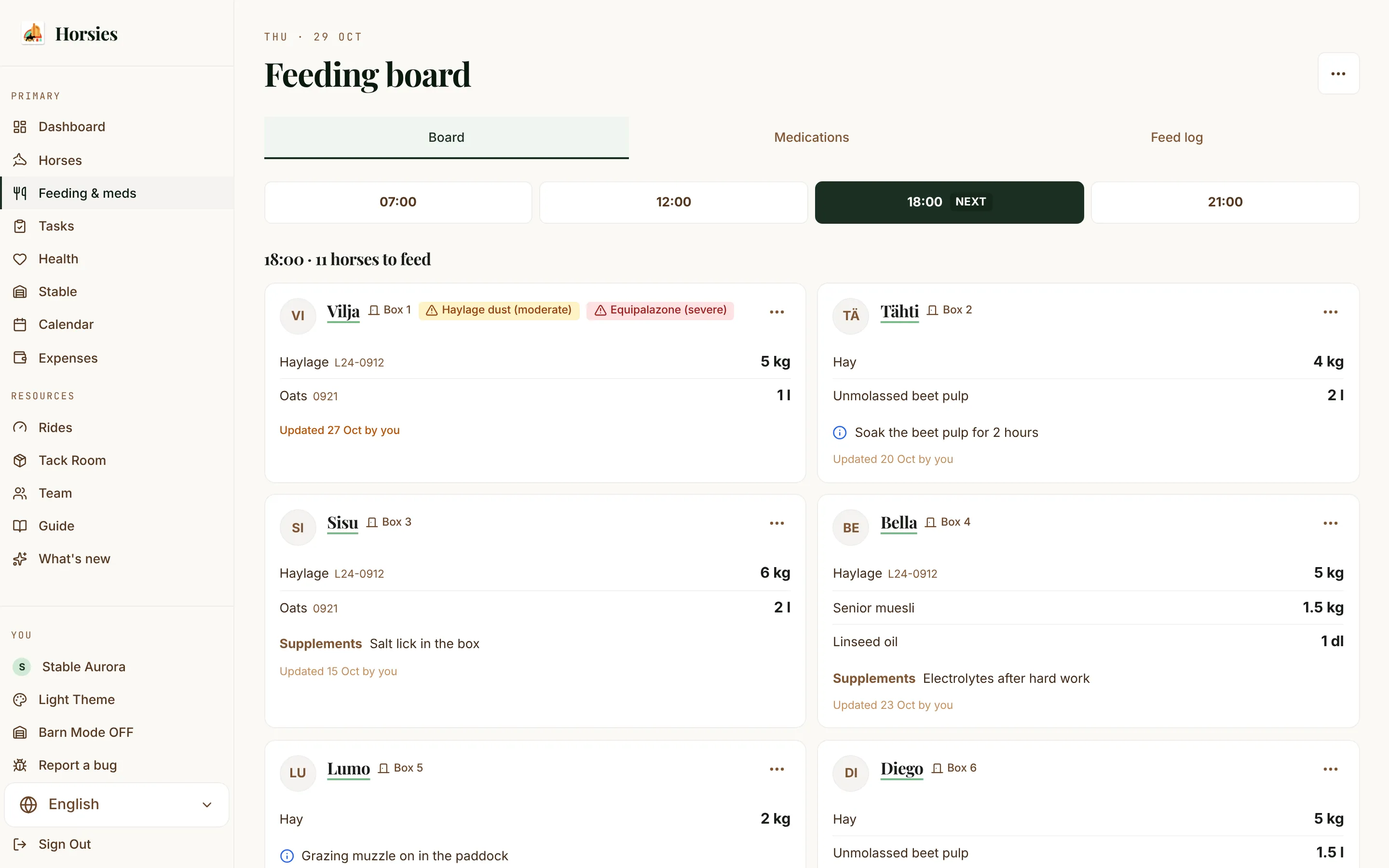
Feed lots, and one feed everywhere
A delivery is now a lot: its batch, where it's stored, and when it was first and last fed. The board shows the lot in use on every line and calls out a new lot started today.
A feed is the same thing in the Feed Log, the feed plans and the board, so renaming it updates every plan. Open a feed and tap Who eats it to set its horses and their amounts in one place.
A feed trace for the vet
When a horse falls ill, tell its Feed tab when it started. The trace shows every lot the horse may have eaten on a timeline, with the batch, supplier and storage place, and what changed shortly before. It prints for the vet.
Feeders, hay nets and analyses
Mark a feed as given by an automatic feeder, for every horse or just one, and at some feeding times only if staff give the rest. The board, the door cards and the prints follow. A hay row can say slow-feeder net 4.5 cm.
A lot keeps its hay analyses, several if you sample at harvest and again later, and the owners of the horses it feeds open them from the board.
The feed record in the Stable Folder In Europe
Deliveries take the manufacturer and batch, and fill the Stable Folder's feed record, ready to print.
04
The whole yard in one entry
Some jobs happen to every horse on the same day. Until October, they meant one form per horse.
Vaccination days and farrier days
In the vaccination form, choose Several horses to save one vaccination for the yard. Each horse gets its own record, expense and due date, and an allergy to the vaccine is checked horse by horse. Same as last time picks the horses of your last vaccination day.
The farrier form works the same way, and each horse's type, cost and next visit start from its own last visit. However the visit is logged, and whoever logs it, the horse's farrier reminder ticks itself off.
Temperature round
Take every horse's temperature in one list: type a value, press Enter, and the next horse is ready. A fever shows at once, and one Save stores them all. Start it from the fever notice on the dashboard, or from Vital Signs.
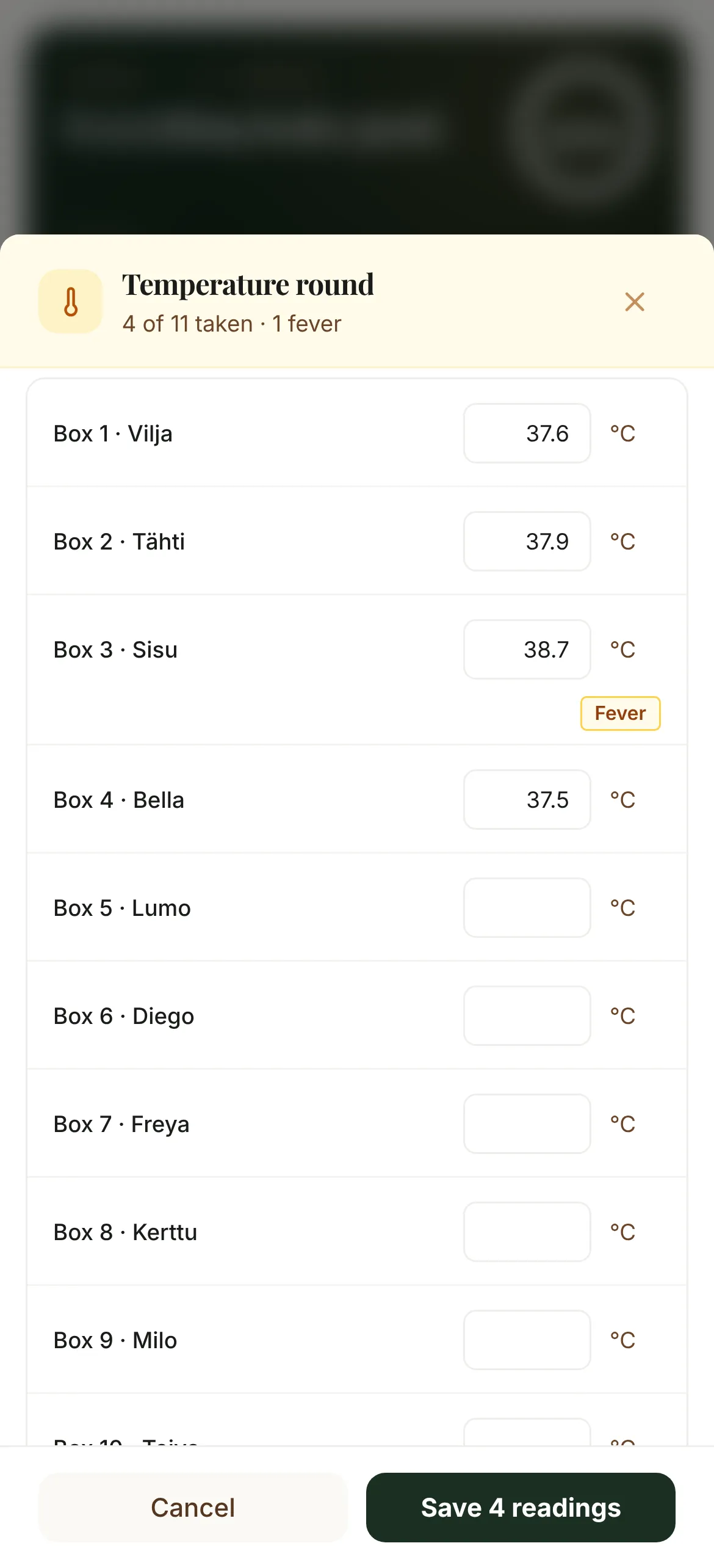
A fever from 38.3 °C, and what needs attention
A temperature of 38.3 °C (100.9 °F) or more raises a fever warning on the dashboard and the horse's profile. It goes away once a reading below the limit is logged.
The dashboard's Health card, the Health page and each profile name what to act on now: a fever, an overdue vaccination, a serious injury or a check that's due. Tap one to open it.
Injuries with their follow-ups
Add a follow-up each time an injury is checked, cleaned or treated: what was done, how it's going, photos and a temperature. The whole course stays in one place. Lameness is now an injury type of its own, with the legs and the 0–5 grade vets use.
05
Running the yard together
Around one horse there are often staff, an owner and a rider or two. October gave each of them a clearer part.
Staff, tasks and routines
On the Team page, switch Staff on for a rider who works at your yard. Staff see and record the yard's tasks on the horses they're on, and work on your subscription.
Menu → Tasks lists the day's jobs by time. Tap Done and everyone sees Done by Eino 07:24. Set up your routines asks what kind of yard you run and builds the feeding rounds from your feed plans, plus turnout, checks and upkeep. You review the list before anything is created.
Places, and where a horse is now
Box is now Place, since a horse's place can be a box, a pen or a pasture, and the Horses list filters by it. At the end of a diary entry, say where you left the horse: the team sees it until someone puts the horse back. On My Horses, Select and Move to… move several horses at once.
Your whole yard on one team
Invite someone to all your horses at once, and see which horses have no one but you. On the Team page, Tell your people writes an announcement for your owners and riders: how they join, what it costs them and how their data is looked after.
Entries stay as written
A health record, expense, competition result or diary entry can be changed or deleted only by the person who wrote it and by the horse's owner. History on an entry shows who changed what and when.
New names for the roles
Owner is now Manager and Rider is now Editor. Who can do what hasn't changed. More on roles in team collaboration.
06
The Stable Folder and printouts
For stables in Finland, the Stable Folder gathers the holding's statutory records from what you log in the app. In October it became ready to hand over.
A folder ready to hand over In Europe
The medication record prints every required entry: dates, reason, dose, who started the treatment, withdrawal period and supplier, with each horse's UELN and microchip. Vaccinations, dewormings, vet visits, and hoof and dental care are listed entry by entry, and every page has its page number.
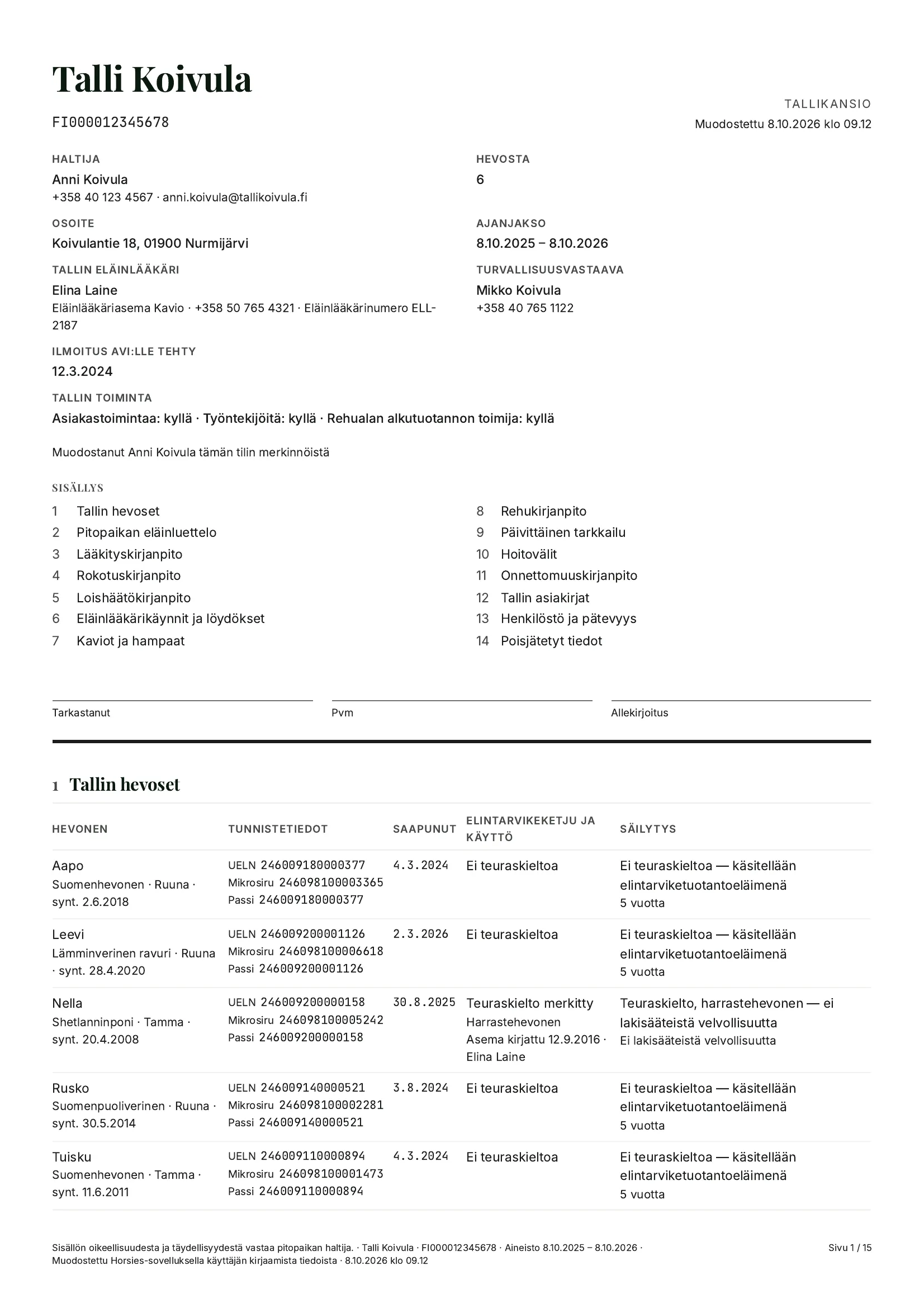
Clearer horse printouts
The vet report now includes hoof care, dewormings and egg counts, papers, and the stable's keeper and vet to call back. Every page shows the horse's name and its page number. Add the sire, dam and dam's sire under Edit Profile, and they print in every horse report.
When a horse dies
Record a death from the ⋯ menu on the horse's profile: the date and how it ended. The horse becomes read-only and frees its seat, and its records stay. In Europe the entry also covers where the carcass went, the passport and the papers, and goes into the stable's death register, which the Stable Folder prints.
07
Simpler on a phone
Most of the time, the app is opened in the barn, on a phone. October made the busiest screens calmer.
A new dashboard
Tiles for feeding, tasks, health and this month, a fever right under the header, and Add (+) for an event, an expense or a task. Some widgets are now off by default. Customize at the bottom chooses what the dashboard shows.
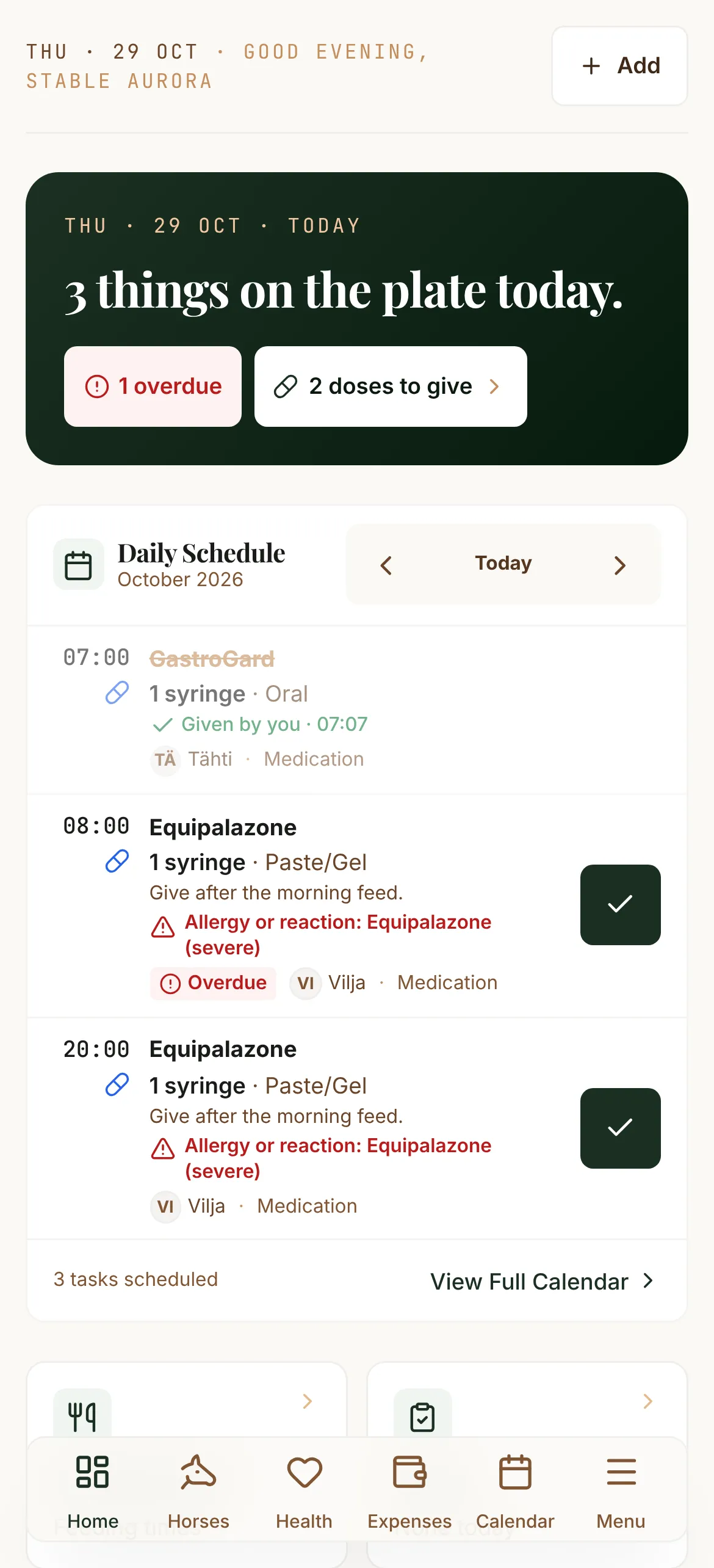
The day's schedule
A dose on the schedule shows the medicine's full name, the dose, how it's given and the first line of its instructions. An overdue item carries a red tag, and a busy day shows eight items and Show all.
Calmer pages
On the feeding board, printing and Choose horses are under ⋯. The medication board lists doses by time or by horse, and a recorded dose opens as a receipt with Undo and Edit. A horse's page has four tabs and More.
The calendar and expenses
The calendar has a real week view with every day side by side, and tapping an empty time adds an event there. An expense takes an amount, a category and a horse. This month is now the same figure on Expenses, the horse's profile and the dashboard.
08
Smaller things worth knowing
-
Now in Swedish
The whole app, privacy policy and terms included. Choose Svenska from the language menu.
-
Download your data
Profile → Account → Download my data: one file with your account, your horses and every record you added.
-
Read-only horses
A horse without a seat now opens read-only, so its records are always there to look at.
-
Hand over a horse, keep riding it
Transfer a horse and stay on its team as a rider. The new owner sees this before accepting.
-
From five horses, a plan for 5, 10, 20 or 30 horses costs less per horse than seats.
-
Dewormings and sprays
The Deworming tile starts a deworming as a medicine, and a spray is now a way to give one.
-
Horses by the names you use
Search by nickname, UELN or microchip. The boards show the nickname first.
-
Long events stay put
Boarding stays and trips no longer drop off the calendar once they have started.
-
First steps and a Guide that shows how
New accounts get a short list of first steps, and the Guide plays a picture sequence of each task.
-
Coggins and health certificates In the US
Keep both on the horse’s Health tab, with the paper attached and a reminder before they run out.
-
Show-ready check In the US
Pick a show date to see whether the papers, vaccines and microchip are in order, then print a show packet.
-
Hunters, western and US levels In the US
Hunter and equitation classes, reining, barrels and cutting, with USDF, USEA and other levels suggested.
The screenshots in this post come from the app's demo yard, not from a customer's account.